参考文献:
A simple way of creating a custom object detection model(这个就是卓晴教程的原版)
YOLOv5的详细使用教程,以及使用yolov5训练自己的数据集_yolo5训练集-CSDN博客

使用预训练模型

安装环境依赖

克隆项目

1
git clone https://github.com/ultralytics/yolov5 # clone repo

镜像

1
git clone https://github.com.cnpmjs.org/ultralytics/yolov5 # clone repo

必要环境

官方给出的要求是:python>=3.7、PyTorch>=1.5

1
2
cd yolov5
pip install -U -r requirements.txt
1
2
3
4
5
6
7
8
9
10
11
12
13
14
15
16
17
18
19
20
21
22
23
24
# pip install -U -r requirements.txt
Cython
numpy==1.17
opencv-python
torch>=1.5
matplotlib
pillow
tensorboard
PyYAML>=5.3
torchvision
scipy
tqdm
git+https://github.com/cocodataset/cocoapi.git#subdirectory=PythonAPI

# Nvidia Apex (optional) for mixed precision training --------------------------
# git clone https://github.com/NVIDIA/apex && cd apex && pip install -v --no-cache-dir --global-option="--cpp_ext" --global-option="--cuda_ext" . --user && cd .. && rm -rf apex

# Conda commands (in place of pip) ---------------------------------------------
# conda update -yn base -c defaults conda
# conda install -yc anaconda numpy opencv matplotlib tqdm pillow ipython
# conda install -yc conda-forge scikit-image pycocotools tensorboard
# conda install -yc spyder-ide spyder-line-profiler
# conda install -yc pytorch pytorch torchvision
# conda install -yc conda-forge protobuf numpy && pip install onnx # https://github.com/onnx/onnx#linux-and-macos

下载预训练模型和标注数据集

执行脚本下载模型

1
2
3
4
5
6
7
8
#!/bin/bash
# Download common models

python3 -c "from utils.google_utils import *;
attempt_download('weights/yolov5s.pt');
attempt_download('weights/yolov5m.pt');
attempt_download('weights/yolov5l.pt');
attempt_download('weights/yolov5x.pt')"

(attempt_download函数在/yolov5/utils/google_utils.py脚本中定义)

下载标注数据集

1
python3 -c "from yolov5.utils.google_utils import gdrive_download; gdrive_download('1n_oKgR81BJtqk75b00eAjdv03qVCQn2f','coco128.zip')" # download dataset

执行上面的代码,会下载:coco128.zip数据集,该数据是COCO train2017数据的一部分,只取了coco数据集中的128张标注的图片,coco128.zip下载完后解压到/yolov5目录下即可,解压后的coco128文件结构如下:

1
2
3
4
5
6
coco128
|-- LICENSE
|-- README.txt # 相关说明
|-- annotations # 空目录
|-- images # 128张jpg图片
`-- labels # 128张标注的txt文件

/yolov5/utils/google_utils.py脚本是下载预训练模型和标注的训练数据集,该脚本代码内容如下:

1
2
3
4
5
6
7
8
9
10
11
12
13
14
15
16
17
18
19
20
21
22
23
24
25
26
27
28
29
30
31
32
33
34
35
36
37
38
39
40
41
42
43
44
45
46
47
48
49
50
51
52
53
54
55
56
57
58
59
60
61
62
63
64
65
66
67
68
69
70
71
72
73
74
75
76
77
78
79
80
81
82
83
84
85
86
87
88
89
90
91
92
93
94
95
96
97
98
99
# This file contains google utils: https://cloud.google.com/storage/docs/reference/libraries
# pip install --upgrade google-cloud-storage
# from google.cloud import storage

import os
import time
from pathlib import Path


def attempt_download(weights):
# Attempt to download pretrained weights if not found locally
weights = weights.strip()
msg = weights + ' missing, try downloading from https://drive.google.com/drive/folders/1Drs_Aiu7xx6S-ix95f9kNsA6ueKRpN2J'

r = 1
if len(weights) > 0 and not os.path.isfile(weights):
d = {'yolov3-spp.pt': '1mM67oNw4fZoIOL1c8M3hHmj66d8e-ni_', # yolov3-spp.yaml
'yolov5s.pt': '1R5T6rIyy3lLwgFXNms8whc-387H0tMQO', # yolov5s.yaml
'yolov5m.pt': '1vobuEExpWQVpXExsJ2w-Mbf3HJjWkQJr', # yolov5m.yaml
'yolov5l.pt': '1hrlqD1Wdei7UT4OgT785BEk1JwnSvNEV', # yolov5l.yaml
'yolov5x.pt': '1mM8aZJlWTxOg7BZJvNUMrTnA2AbeCVzS', # yolov5x.yaml
}

file = Path(weights).name
if file in d:
r = gdrive_download(id=d[file], name=weights)

if not (r == 0 and os.path.exists(weights) and os.path.getsize(weights) > 1E6): # weights exist and > 1MB
os.remove(weights) if os.path.exists(weights) else None # remove partial downloads
s = "curl -L -o %s 'https://storage.googleapis.com/ultralytics/yolov5/ckpt/%s'" % (weights, file)
r = os.system(s) # execute, capture return values

# Error check
if not (r == 0 and os.path.exists(weights) and os.path.getsize(weights) > 1E6): # weights exist and > 1MB
os.remove(weights) if os.path.exists(weights) else None # remove partial downloads
raise Exception(msg)


def gdrive_download(id='1HaXkef9z6y5l4vUnCYgdmEAj61c6bfWO', name='coco.zip'):
# https://gist.github.com/tanaikech/f0f2d122e05bf5f971611258c22c110f
# Downloads a file from Google Drive, accepting presented query
# from utils.google_utils import *; gdrive_download()
t = time.time()

print('Downloading https://drive.google.com/uc?export=download&id=%s as %s... ' % (id, name), end='')
os.remove(name) if os.path.exists(name) else None # remove existing
os.remove('cookie') if os.path.exists('cookie') else None

# Attempt file download
os.system("curl -c ./cookie -s -L \"https://drive.google.com/uc?export=download&id=%s\" > /dev/null" % id)
if os.path.exists('cookie'): # large file
s = "curl -Lb ./cookie \"https://drive.google.com/uc?export=download&confirm=`awk '/download/ {print $NF}' ./cookie`&id=%s\" -o %s" % (
id, name)
else: # small file
s = "curl -s -L -o %s 'https://drive.google.com/uc?export=download&id=%s'" % (name, id)
r = os.system(s) # execute, capture return values
os.remove('cookie') if os.path.exists('cookie') else None

# Error check
if r != 0:
os.remove(name) if os.path.exists(name) else None # remove partial
print('Download error ') # raise Exception('Download error')
return r

# Unzip if archive
if name.endswith('.zip'):
print('unzipping... ', end='')
os.system('unzip -q %s' % name) # unzip
os.remove(name) # remove zip to free space

print('Done (%.1fs)' % (time.time() - t))
return r

# def upload_blob(bucket_name, source_file_name, destination_blob_name):
# # Uploads a file to a bucket
# # https://cloud.google.com/storage/docs/uploading-objects#storage-upload-object-python
#
# storage_client = storage.Client()
# bucket = storage_client.get_bucket(bucket_name)
# blob = bucket.blob(destination_blob_name)
#
# blob.upload_from_filename(source_file_name)
#
# print('File {} uploaded to {}.'.format(
# source_file_name,
# destination_blob_name))
#
#
# def download_blob(bucket_name, source_blob_name, destination_file_name):
# # Uploads a blob from a bucket
# storage_client = storage.Client()
# bucket = storage_client.get_bucket(bucket_name)
# blob = bucket.blob(source_blob_name)
#
# blob.download_to_filename(destination_file_name)
#
# print('Blob {} downloaded to {}.'.format(
# source_blob_name,
# destination_file_name))

训练下载的coco128数据集

创建训练数据集的配置文件Dataset.yaml
上面下载好coco128.zip小型数据集之后,这些数据集可以用于训练和验证
/content/yolov5/models/yolov5l.yaml。coco128.yaml中定义了:
训练图片的路径(或训练图片列表的.txt文件)
与验证集相同的图片
目标的类别数
类名列表

1
2
3
4
5
6
7
8
9
10
11
12
13
14
15
16
17
18
19
20
21
22
23
24
25
26
# COCO 2017 dataset http://cocodataset.org - first 128 training images
# Download command: python -c "from yolov5.utils.google_utils import gdrive_download; gdrive_download('1n_oKgR81BJtqk75b00eAjdv03qVCQn2f','coco128.zip')"
# Train command: python train.py --data ./data/coco128.yaml
# Dataset should be placed next to yolov5 folder:
# /parent_folder
# /coco128
# /yolov5


# 训练集和验证集 (图片的目录路径或 *.txt图片路径)
train: ../coco128/images/train2017/
val: ../coco128/images/train2017/

# 类别数 number of classes
nc: 80

# 类别列表 class names
names: ['person', 'bicycle', 'car', 'motorcycle', 'airplane', 'bus', 'train', 'truck', 'boat', 'traffic light',
'fire hydrant', 'stop sign', 'parking meter', 'bench', 'bird', 'cat', 'dog', 'horse', 'sheep', 'cow',
'elephant', 'bear', 'zebra', 'giraffe', 'backpack', 'umbrella', 'handbag', 'tie', 'suitcase', 'frisbee',
'skis', 'snowboard', 'sports ball', 'kite', 'baseball bat', 'baseball glove', 'skateboard', 'surfboard',
'tennis racket', 'bottle', 'wine glass', 'cup', 'fork', 'knife', 'spoon', 'bowl', 'banana', 'apple',
'sandwich', 'orange', 'broccoli', 'carrot', 'hot dog', 'pizza', 'donut', 'cake', 'chair', 'couch',
'potted plant', 'bed', 'dining table', 'toilet', 'tv', 'laptop', 'mouse', 'remote', 'keyboard', 'cell phone',
'microwave', 'oven', 'toaster', 'sink', 'refrigerator', 'book', 'clock', 'vase', 'scissors', 'teddy bear',
'hair drier', 'toothbrush']

创建标签

对数据集进行打标签,可以选择如下两种打标工具:
Labelbox
CVAT
也可以使用LabelImg,选用ylolo格式进行标注
将标签导出为darknet格式,每个标注图像有一个.txt文件(如果图像中没有对象,则不需要.txt文件),*.txt文件格式如下:

每行一个对象
每行都是:class x_center y_center width height格式
框的坐标格式必须采用归一化格式的xywh(从0到1),如果你框以像素为单位,则将x_center和width除以图像宽度,将y_center和height除以图像的高度
类别是从索引0开始的
通过在器路径名中将/images/.jpg替换为/label/.txt,可以定位每个图像的标签文件,示例图像和标签对为:

1
2
dataset/images/train2017/000000109622.jpg  # image
dataset/labels/train2017/000000109622.txt # label
1
2
3
4
5
6
7
8
45 0.479492 0.688771 0.955609 0.5955
45 0.736516 0.247188 0.498875 0.476417
50 0.637063 0.732938 0.494125 0.510583
45 0.339438 0.418896 0.678875 0.7815
49 0.646836 0.132552 0.118047 0.096937
49 0.773148 0.129802 0.090734 0.097229
49 0.668297 0.226906 0.131281 0.146896
49 0.642859 0.079219 0.148063 0.148062

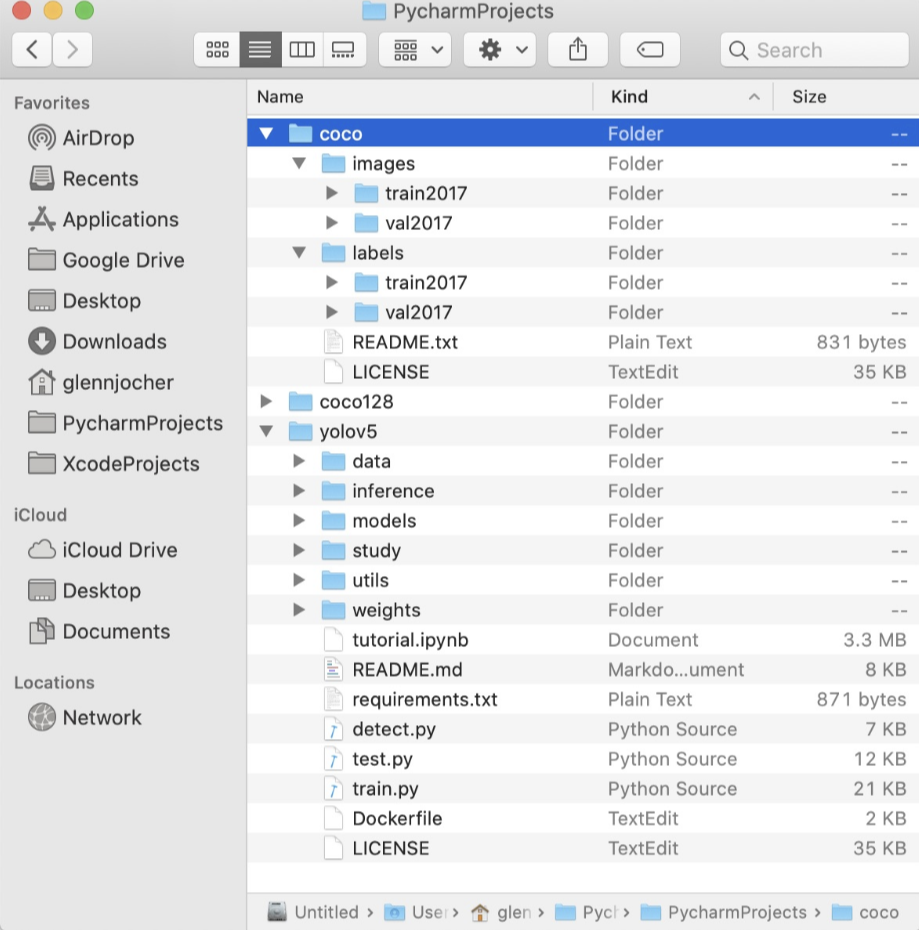
组织文件结构

/coco128目录应该和yolov5目录同级,同时确保coco128/labels和coco128/images两个目录同级
4cc9eb4348385e98b15dc0f5db0dc95

选择训练模型

上面已经修改了自定义数据集的配置文件,同时组织好了数据。下面就可以选择一个模型进行训练了。

从./models目录下选择一个模型的配置文件,这里我们选择yolov5s.ymal,这是一个最小最快的模型。关于其他模型之间的比较下面介绍。选择好模型之后,如果你使用的不是coco数据集进行训练,而是自定义的数据集,此时只需要修改*.yaml配置文件中的nc: 80参数和数据的类别列表

下面是yolo5s.ymal配置文件的内容:

1
2
3
4
5
6
7
8
9
10
11
12
13
14
15
16
17
18
19
20
21
22
23
24
25
26
27
28
29
30
31
32
33
34
35
36
37
38
39
40
41
42
43
44
45
46
47
48
49
50
51
52
# parameters
nc: 80 # number of classes
depth_multiple: 0.33 # model depth multiple
width_multiple: 0.50 # layer channel multiple

# anchors
anchors:
- [116,90, 156,198, 373,326] # P5/32
- [30,61, 62,45, 59,119] # P4/16
- [10,13, 16,30, 33,23] # P3/8

# YOLOv5 backbone
backbone:
# [from, number, module, args]
[[-1, 1, Focus, [64, 3]], # 0-P1/2
[-1, 1, Conv, [128, 3, 2]], # 1-P2/4
[-1, 3, BottleneckCSP, [128]],
[-1, 1, Conv, [256, 3, 2]], # 3-P3/8
[-1, 9, BottleneckCSP, [256]],
[-1, 1, Conv, [512, 3, 2]], # 5-P4/16
[-1, 9, BottleneckCSP, [512]],
[-1, 1, Conv, [1024, 3, 2]], # 7-P5/32
[-1, 1, SPP, [1024, [5, 9, 13]]],
]

# YOLOv5 head
head:
[[-1, 3, BottleneckCSP, [1024, False]], # 9

[-1, 1, Conv, [512, 1, 1]],
[-1, 1, nn.Upsample, [None, 2, 'nearest']],
[[-1, 6], 1, Concat, [1]], # cat backbone P4
[-1, 3, BottleneckCSP, [512, False]], # 13

[-1, 1, Conv, [256, 1, 1]],
[-1, 1, nn.Upsample, [None, 2, 'nearest']],
[[-1, 4], 1, Concat, [1]], # cat backbone P3
[-1, 3, BottleneckCSP, [256, False]],
[-1, 1, nn.Conv2d, [na * (nc + 5), 1, 1]], # 18 (P3/8-small)

[-2, 1, Conv, [256, 3, 2]],
[[-1, 14], 1, Concat, [1]], # cat head P4
[-1, 3, BottleneckCSP, [512, False]],
[-1, 1, nn.Conv2d, [na * (nc + 5), 1, 1]], # 22 (P4/16-medium)

[-2, 1, Conv, [512, 3, 2]],
[[-1, 10], 1, Concat, [1]], # cat head P5
[-1, 3, BottleneckCSP, [1024, False]],
[-1, 1, nn.Conv2d, [na * (nc + 5), 1, 1]], # 26 (P5/32-large)

[[], 1, Detect, [nc, anchors]], # Detect(P5, P4, P3)
]

yolov5s.yaml配置文件中主要定义了:

  • 参数(parameters):类别等
  • anchor
  • YOLOv5 backbone
  • YOLOv5 head

开始训练

运行下面的命令训练coco128.ymal,训练5epochs。可以有两种训练方式,如下参数:

—cfg yolov5s.yaml —weights ‘’:从头开始训练
—cfg yolov5s.yaml —weights yolov5s.pt:从预训练的模型加载开始训练
YOLOv5在coco128上训练5epochs的命令:

1
python train.py --img 640 --batch 16 --epochs 5 --data ./data/coco128.yaml --cfg ./models/yolov5s.yaml --weights ''

训练的更多可选参数:

1
2
3
4
5
6
7
8
9
10
11
12
13
14
15
16
17
18
--epochs:训练的epoch,默认值300
--batch-size:默认值16
--cfg:模型的配置文件,默认为yolov5s.yaml
--data:数据集的配置文件,默认为data/coco128.yaml
--img-size:训练和测试输入大小,默认为[640, 640]
--rect:rectangular training,布尔值
--resume:是否从最新的last.pt中恢复训练,布尔值
--nosave:仅仅保存最后的checkpoint,布尔值
--notest:仅仅在最后的epoch上测试,布尔值
--evolve:进化超参数(evolve hyperparameters),布尔值
--bucket:gsutil bucket,默认值''
--cache-images:缓存图片可以更快的开始训练,布尔值
--weights:初始化参数路径,默认值''
--name:如果提供,将results.txt重命名为results_name.txt
--device:cuda设备,例如:0或0,1,2,3或cpu,默认''
--adam:使用adam优化器,布尔值
--multi-scale:改变图片尺寸img-size +/0- 50%,布尔值
--single-cls:训练单个类别的数据集,布尔值

测试

测试的更多可选参数:

1
2
3
4
5
6
7
8
9
10
11
12
13
14
--weights :预训练模型路径,默认值weights/yolov5s.pt
--data:数据集的配置文件,默认为data/coco.yaml
--batch-size:默认值32
--img-size:推理大小(pixels),默认640
--conf-thres:目标置信度阈值,默认0.001
--iou-thres:NMS的IOU阈值,默认0.65
--save-json:把结果保存为cocoapi-compatible的json文件
--task:默认val,可选其他值:val, test, study
--device:cuda设备,例如:0或0,1,2,3或cpu,默认''
--half:半精度的FP16推理
--single-cls:将其视为单类别,布尔值
--augment:增强推理,布尔值
--verbose:显示类别的mAP,布尔值
————————————————
1
python test.py --weights yolov5s.pt --data ./data/coco.yaml --img 640

实现yolo自由(自训练模型)

上面的都是官方给出的训练模型,我也尝试了一下训练自己的。

数据集

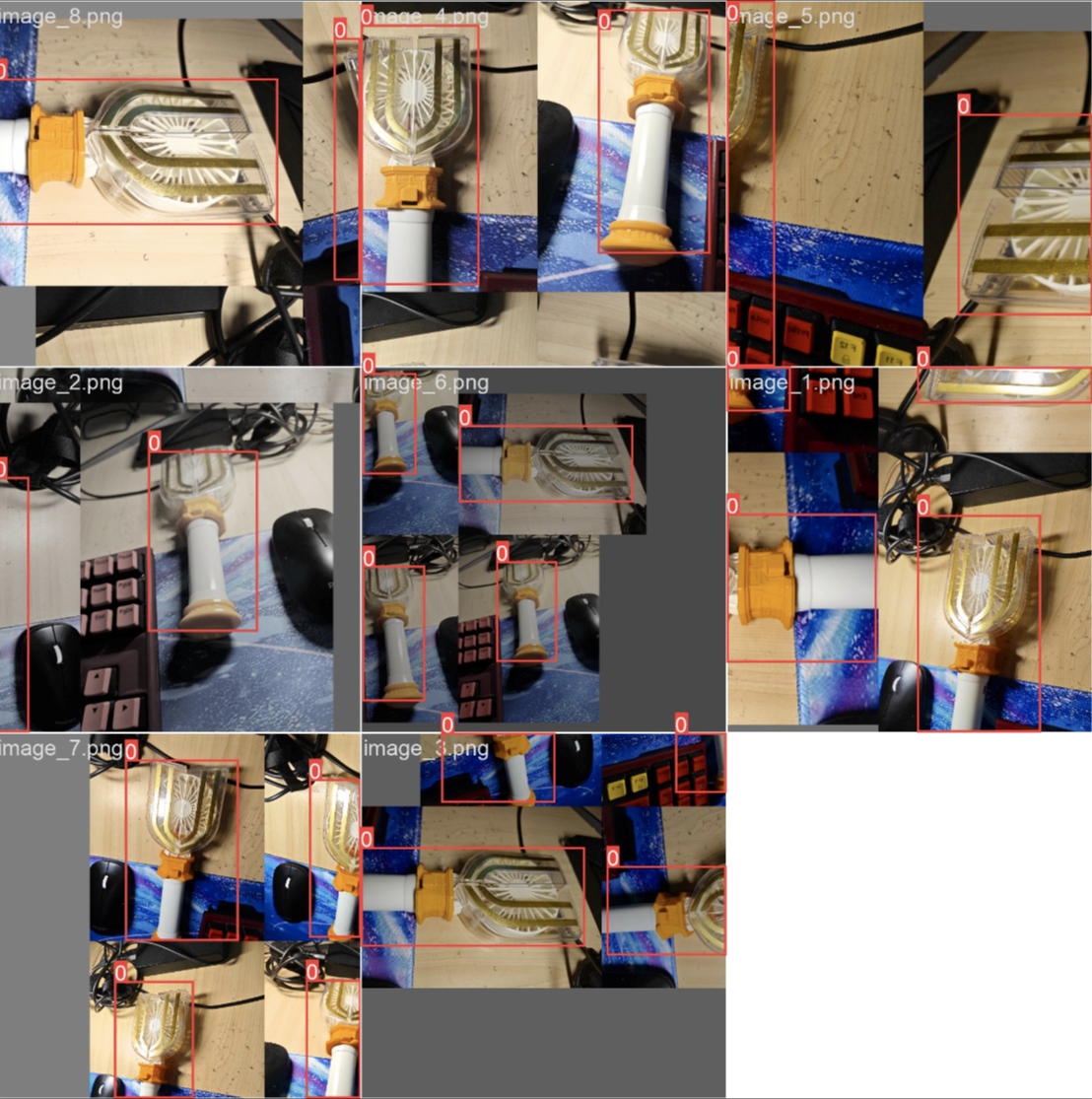
首先是image的手框转换成yolo文件,我使用的是清华小丑(bushi)给的开源工具https://www.makesense.ai/生成的。(由于小车上的回传节点还没开始写就用手机try一下)

yolo环境配置

1
git clone https://github.com/ultralytics/yolov5 # clone repo

同上,不过目录结构似乎不太一样(尤其是datasets的部分,差异太多我干脆直接提出来了)
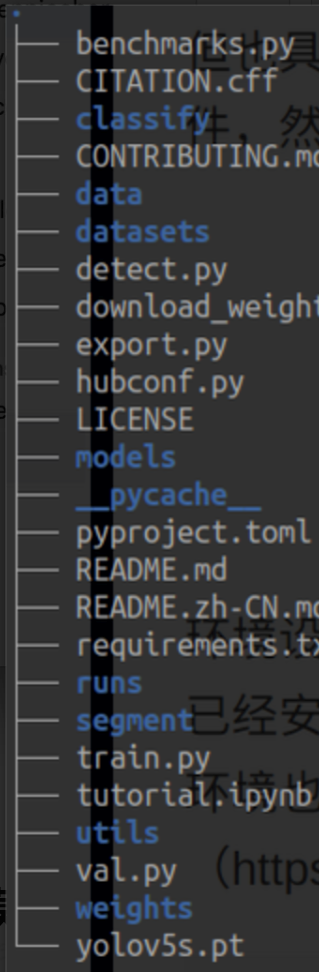
f299a1faae42c3dfa23869900cfc571

数据集标注好之后,存放如下目录格式:

1
2
3
4
5
6
7
8
9
10
11
12
13
14
15
16
17
18
19
20
21
22
23
(yolov5) shl@zfcv:~/shl/yolov5$ tree hat_hair_beard
hat_hair_beard
├── images
│ ├── train2017 # 训练集图片,这里我只列举几张示例
│ │ ├── 000050.jpg
│ │ ├── 000051.jpg
│ │ └── 000052.jpg
│ └── val2017 # 验证集图片
│ ├── 001800.jpg
│ ├── 001801.jpg
│ └── 001802.jpg
└── labels
├── train2017 # 训练集的标签文件
│ ├── 000050.txt
│ ├── 000051.txt
│ └── 000052.txt
└── val2017 # 验证集的标签文件
├── 001800.txt
├── 001801.txt
└── 001802.txt

6 directories, 13 files
(yolov5) shl@zfcv:~/shl/yolov5$

修改配置文件

数据配置文件

1
2
3
4
5
6
7
8
9
10
11
12
13
14
15
16
17
18
19
20
# YOLOv5 🚀 by Ultralytics, AGPL-3.0 license
# COCO128 dataset https://www.kaggle.com/ultralytics/coco128 (first 128 images from COCO train2017) by Ultralytics
# Example usage: python train.py --data coco128.yaml
# parent
# ├── yolov5
# └── datasets
# └── coco128 ← downloads here (7 MB)

# Train/val/test sets as 1) dir: path/to/imgs, 2) file: path/to/imgs.txt, or 3) list: [path/to/imgs1, path/to/imgs2, ..]
path: ./datasets # dataset root dir
train: images/train_test # train images (relative to 'path') 128 images
val: images/val_test # val images (relative to 'path') 128 images
test: # test images (optional)

# Classes
names:
0: dijia

# Download script/URL (optional)
#download: https://ultralytics.com/assets/coco128.zip

主要修改了train和val的路径,以及names的数量和名称(用于测试)

模型配置文件

1
2
3
4
5
6
7
8
9
10
11
12
13
14
15
16
17
18
19
20
21
22
23
24
25
26
27
28
29
30
31
32
33
34
35
36
37
38
39
40
41
42
43
44
45
46
47
48
49
# YOLOv5 🚀 by Ultralytics, AGPL-3.0 license

# Parameters
nc: 1 # number of classes
depth_multiple: 0.33 # model depth multiple
width_multiple: 0.50 # layer channel multiple
anchors:
- [10, 13, 16, 30, 33, 23] # P3/8
- [30, 61, 62, 45, 59, 119] # P4/16
- [116, 90, 156, 198, 373, 326] # P5/32

# YOLOv5 v6.0 backbone
backbone:
# [from, number, module, args]
[
[-1, 1, Conv, [64, 6, 2, 2]], # 0-P1/2
[-1, 1, Conv, [128, 3, 2]], # 1-P2/4
[-1, 3, C3, [128]],
[-1, 1, Conv, [256, 3, 2]], # 3-P3/8
[-1, 6, C3, [256]],
[-1, 1, Conv, [512, 3, 2]], # 5-P4/16
[-1, 9, C3, [512]],
[-1, 1, Conv, [1024, 3, 2]], # 7-P5/32
[-1, 3, C3, [1024]],
[-1, 1, SPPF, [1024, 5]], # 9
]

# YOLOv5 v6.0 head
head: [
[-1, 1, Conv, [512, 1, 1]],
[-1, 1, nn.Upsample, [None, 2, "nearest"]],
[[-1, 6], 1, Concat, [1]], # cat backbone P4
[-1, 3, C3, [512, False]], # 13

[-1, 1, Conv, [256, 1, 1]],
[-1, 1, nn.Upsample, [None, 2, "nearest"]],
[[-1, 4], 1, Concat, [1]], # cat backbone P3
[-1, 3, C3, [256, False]], # 17 (P3/8-small)

[-1, 1, Conv, [256, 3, 2]],
[[-1, 14], 1, Concat, [1]], # cat head P4
[-1, 3, C3, [512, False]], # 20 (P4/16-medium)

[-1, 1, Conv, [512, 3, 2]],
[[-1, 10], 1, Concat, [1]], # cat head P5
[-1, 3, C3, [1024, False]], # 23 (P5/32-large)

[[17, 20, 23], 1, Detect, [nc, anchors]], # Detect(P3, P4, P5)
]

这里改个nc就行了(数据集的类别数)

开始训练

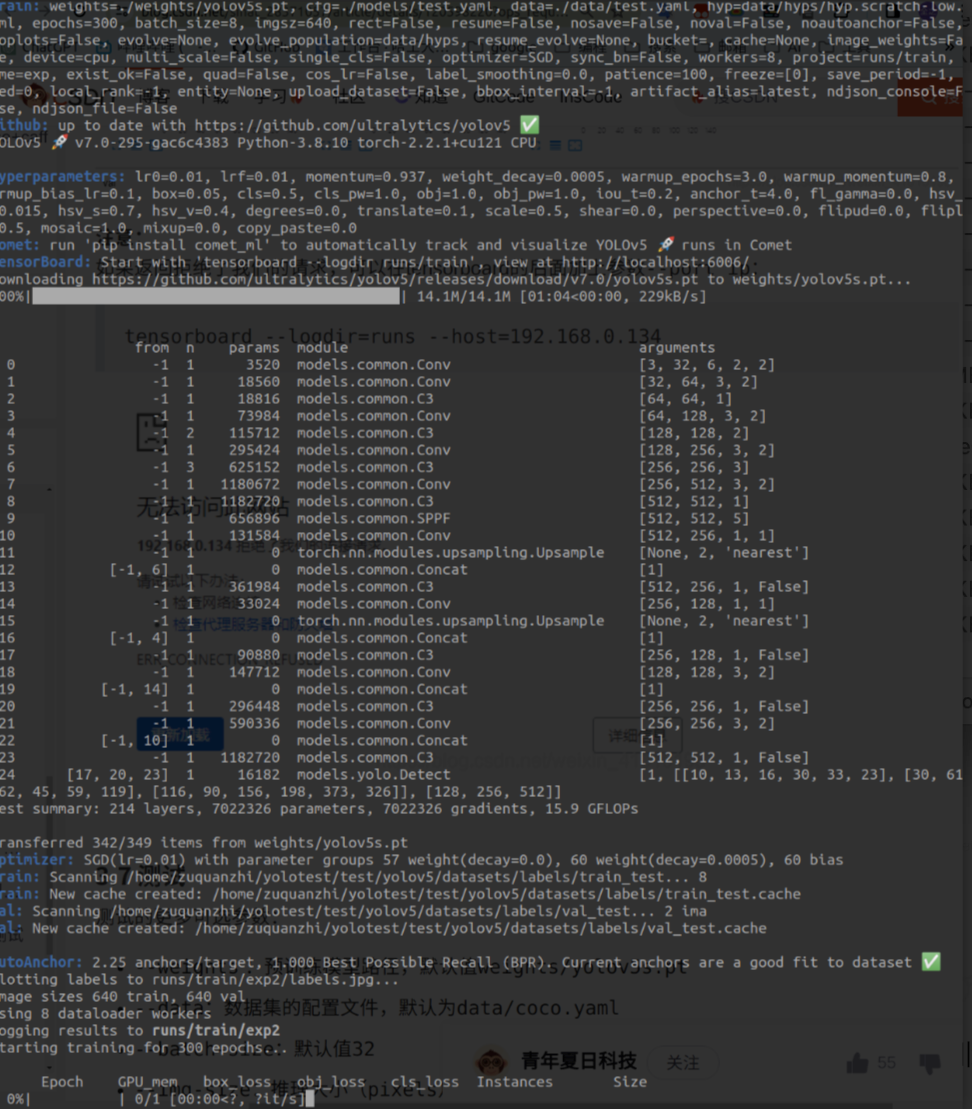
在终端输入以下命令

1
python train.py --img 640 --batch 8 --epochs 300 --data ./data/test.yaml --cfg ./models/test.yaml --weights ./weights/yolov5s.pt --device cpu

各个参数作用:

  • img:640×640
  • batch:类别
  • epochs:训练迭代次数
  • data:数据配置文件位置
  • cfg:模型配置文件位置
  • weights: 训练权重数据,如果本地没有的话应该会自动下载,以开始训练
  • device: 这个还没搞明白 正常来说是应该调用gpu的,但是我的驱动似乎有点问题,故 cpu,启动!
a5aa4e4d73279a6ea804ffc393a818b

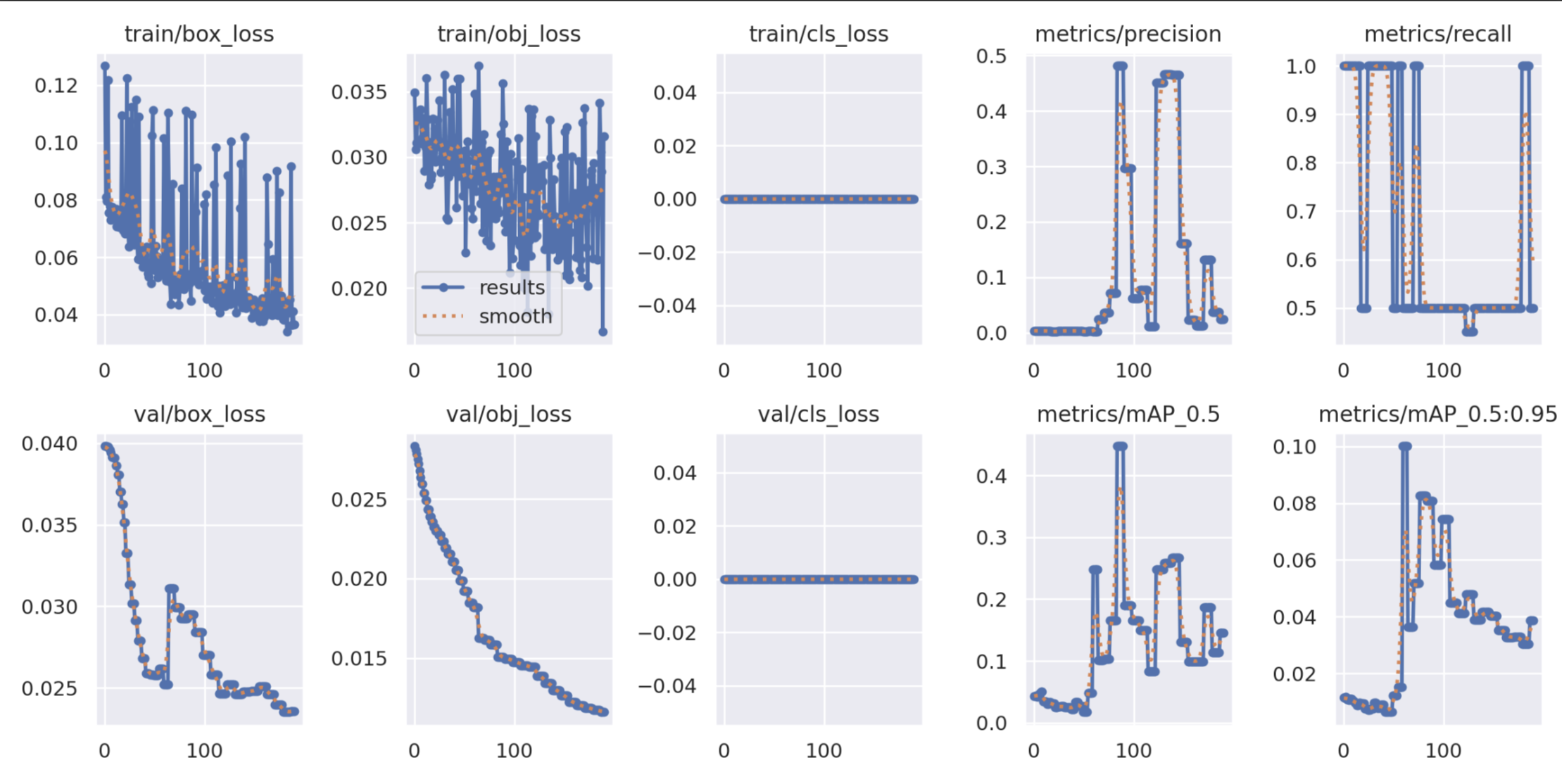
训练结束后,会生成两个预训练的模型:

  • best.pt:保存的是中间一共比较好模型
  • last.pt:训练结束后保存的最后模型

尽量把最终训练的模型保存拷贝一份,防止下载再训练给覆盖,白玩

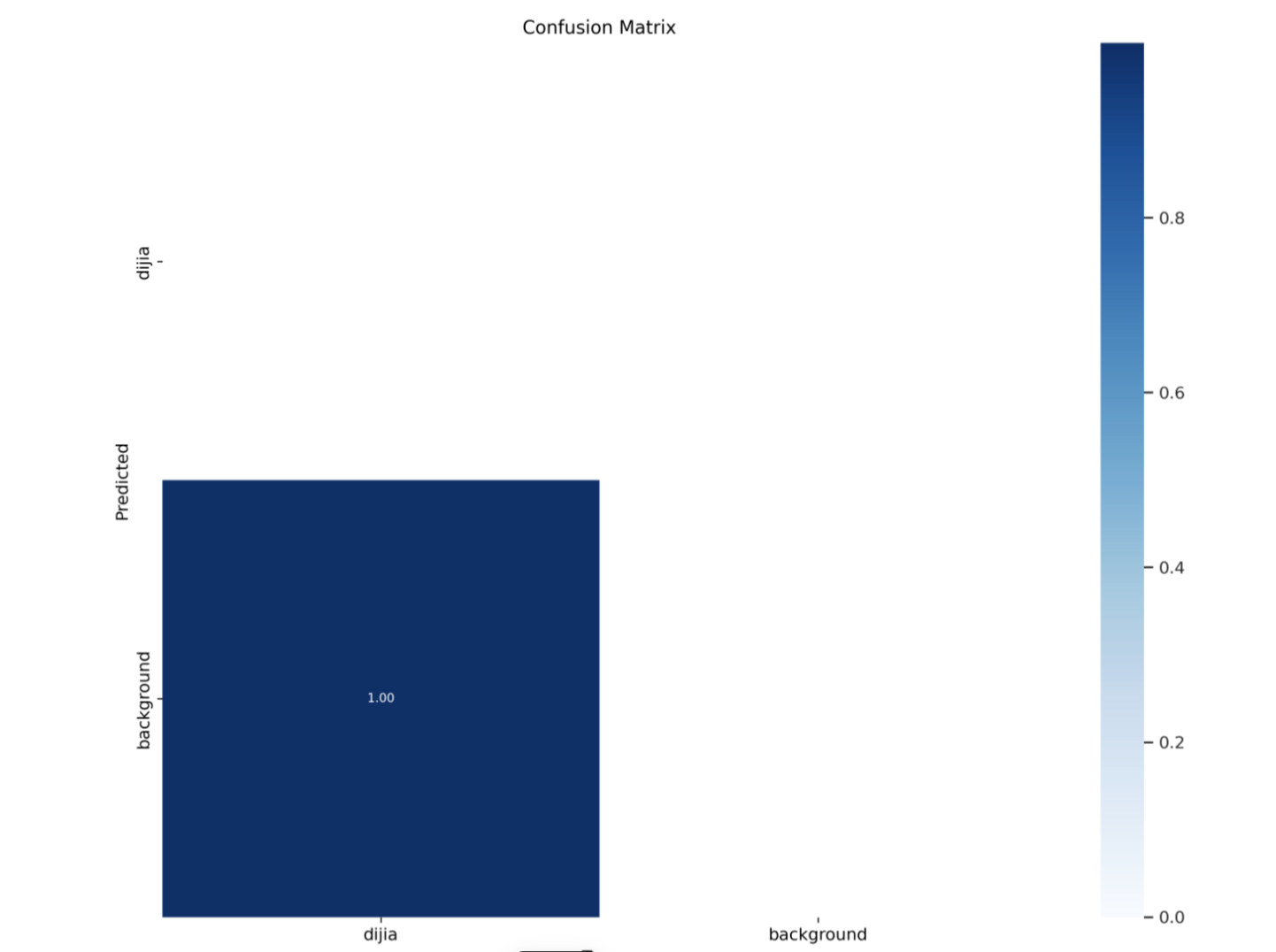
浅浅展示训练成果

d3b58a358174697795bb89c1d86d4bb

4edb813049a6da8f7e926d72ebb0357

d164b7d5fd9b273031ec37aca0e9872

测试模型

1
python3 detect.py --source ./data/images/image_9.png --weights ./weights/best.pt --device cpu

由于数据量较小,准确率较低,就不放图了)